One film, three codes
Picture a distributor, invented for this article, that stocks a 23 micron clear machine stretch film. Over a few years it has picked up three product codes: the original one, a second created when the supplier changed, and a third set up for a large customer who wanted their own reference on paperwork. The stock report shows three lines. One looks slow, one looks healthy and one shows a recent delivery. Nobody is sure whether the business holds too much of this film or too little, because nobody is looking at it as one product.
Sales reporting has the same problem in reverse. A customer who moved from the old code to the new one looks as though they stopped buying, when they only changed reference.
Where duplicate codes come from
- Supplier changes. A new source for the same specification often gets a new code rather than the old one being reused.
- Pack and roll variations. Six rolls to a box and a single roll of the same film are legitimately different codes. They may be treated as the same film for stock-cover purposes, but only once a conversion between the units has been agreed.
- Customer-specific codes. Created to match a customer’s purchasing system, then used for stock as well.
- Legacy codes. Kept alive because open orders or history still point at them.
- Branch or warehouse codes. Different sites sometimes hold the same item under different references.
None of these are mistakes. They are the residue of normal trading. The mistake is to treat the code as the product when reviewing stock or customers.
Similar descriptions are not proof
It is tempting to group codes by matching words in the description. “Clear film 500” could be a 17 micron hand film or a 23 micron machine film. Two codes with identical text may differ in core size, and a customer with the wrong core cannot use the roll. Matching gauge, width, length, core and colour is the starting check, not the whole test. Approved specifications, intended use and the team’s approval govern the mapping, including other material properties where they matter. If any of the specification fields is unknown, the codes are not equivalent yet, whatever the description says. Different pack units can be grouped only after an agreed conversion; a box is not automatically interchangeable with a roll when stock is allocated.
That is why mapping is a decision for the people who buy and sell the product, recorded and signed off, not something inferred from a spreadsheet and applied quietly.
What the reporting work taught us
An internal reporting assistant was built and refined for a UK supplier of packaging films and machinery, working on its sales and stock exports, including data exported from its ERP system. Grouping equivalent film codes and answering stock movement questions were part of that work, and staff validated example outputs against the source reports. What follows is what changed in the method.
Four checks turned out to matter more than any clever analysis:
- Choose the correct document. There is usually more than one stock report and more than one period. A wrong export can look plausible and even reconcile internally, so verify the report type, period and site against the question before calculating anything.
- Confirm scope, then reconcile rows. Confirm the export’s filters and scope with the team, then compare the loaded row count with the file. Truncated files drop lines silently; rows excluded before export can only be caught by the scope check.
- Reconcile totals. Quantities and values in the combined view must add back to the source report for the same period. Where they do not, find out why before anyone reads the output.
- Check against source records. Pick a handful of products and trace them from the output back to the original lines. If the trail breaks, the output is not ready.
The fifth lesson was about slow-stock flags, and it deserves its own section below.
A sample mapping
Illustrative example, invented codes
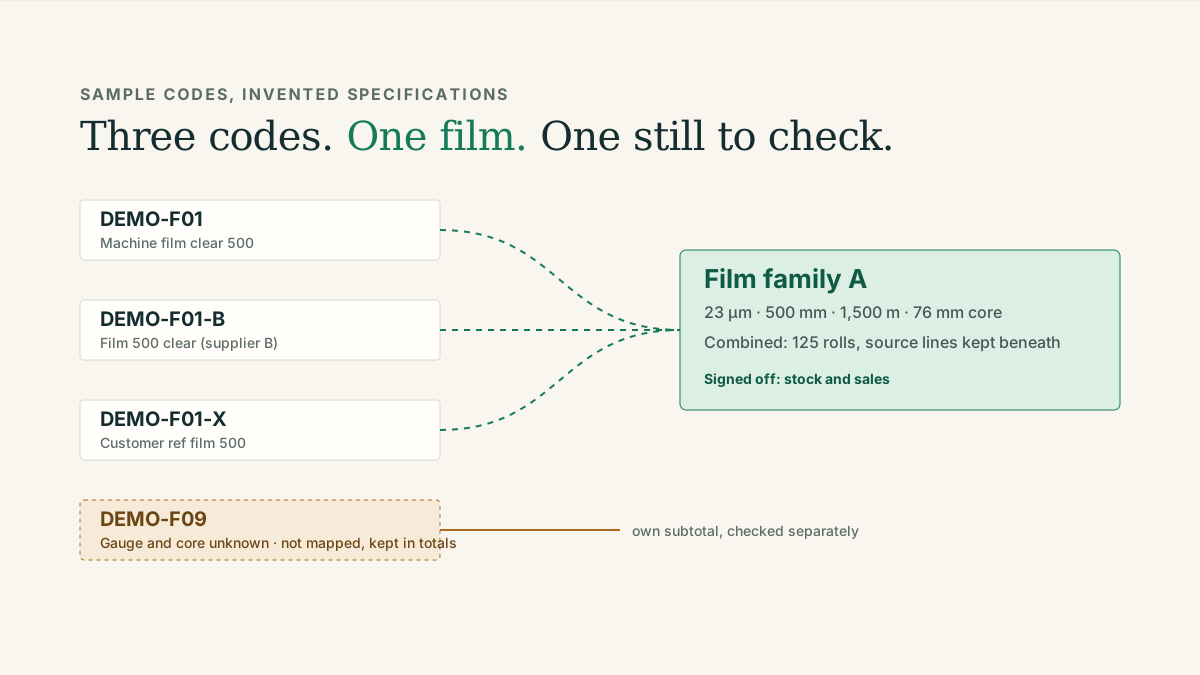
A mapping table that a stock controller and a sales manager could sign off together. The last row shows what an unresolved code looks like.
| Sample code | Description as held | Gauge, width, length, core | Agreed family | Unit | Sign-off |
|---|---|---|---|---|---|
| DEMO-F01 | Machine film clear 500 | 23 µm, 500 mm, 1,500 m, 76 mm | Film family A | Roll | Stock and sales, 15 Sep |
| DEMO-F01-B | Film 500 clear (supplier B) | 23 µm, 500 mm, 1,500 m, 76 mm | Film family A | Roll | Stock and sales, 15 Sep |
| DEMO-F01-X | Customer ref film 500 | 23 µm, 500 mm, 1,500 m, 76 mm | Film family A | Roll | Stock and sales, 15 Sep |
| DEMO-F02 | Film clear 500 hand | 17 µm, 500 mm, 300 m, 50 mm | Film family B | Roll | Stock and sales, 15 Sep |
| DEMO-F09 | Film 500 | Gauge and core unknown | Not mapped | Roll | Needs specification check |
DEMO-F02 shares the words “film clear 500” with the family A codes and is a different product. DEMO-F09 stays visible in the overall report as an unmapped line, with its own subtotal, and is excluded only from the confirmed family total until someone confirms what it is.
Sign-off checklist
- Every code in the family has the same gauge, width, length, core and colour recorded, from the product master or a data sheet, not from the description.
- The unit is the same for every code, or a conversion has been agreed and written down.
- Someone from stock and someone from sales have both agreed the family, and the date is recorded.
- Codes that could not be confirmed are listed as unmapped and kept in the totals, never dropped.
- The combined view still shows the original code lines underneath, so a query can be traced.
- The mapping is reviewed when a supplier changes or a new code is created.
Slow stock and recent arrivals
A slow-stock rule such as “no dispatch in 90 days” will flag a product that arrived last week, because a new delivery has had no time to move. In the reporting work described above, excluding recent arrivals from slow-stock flags was one of the practical corrections the team asked for. An illustrative version of the rule is “no dispatch in 90 days and no receipt in the last 14 days”, with both periods agreed by the people who manage the stock.
The exclusion is a review rule, not proof that a family is healthy. A recent receipt on one code can sit alongside older, unmoving stock on another code in the same family, so keep the source code and receipt detail visible beneath the family view and check the older stock separately rather than suppressing the whole family.
Keep the detail visible
Grouping is for review, not for replacing the records. The combined view answers “how much of this film do we hold and how fast is it moving”. The original lines answer “which code, which supplier, which customer”. A useful report shows the family total with the source lines beneath it, so that the moment someone asks “where did 125 rolls come from”, the answer is on the same page. The reporting example on the home page shows this layout with invented data, in the product codes panel.
This is the third of the three workflows on the reporting assistants page. The customer side of the same problem, accounts that look lapsed because a code changed, is covered in how to spot customers who have stopped reordering.