Workflow 03 / Sales companion

Walk into the first call prepared.

A bespoke browser companion for B2B salespeople. It helps you review the professional profile and company context you choose, organise source-linked research, note possible business issues as labelled inferences, and draft a call opener or first email for you to edit.

Available to scope and build for your team. Drafts are for your review; nothing is sent on your behalf.

Your sources. Your call structure. Your judgement on every draft.

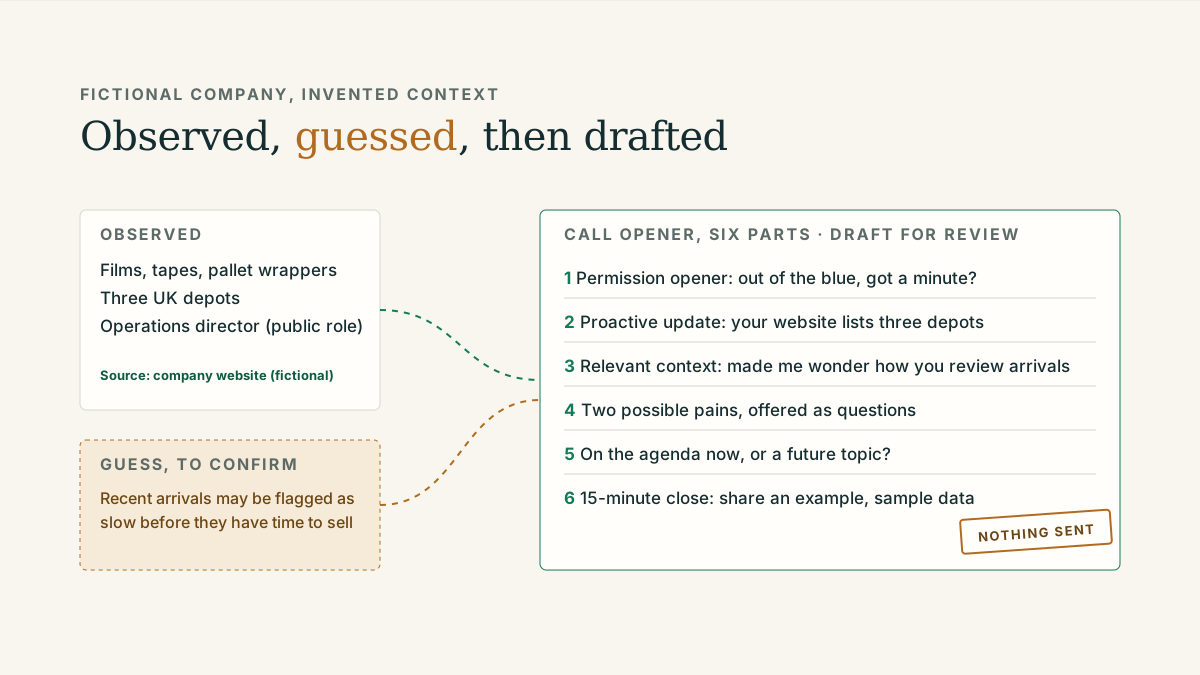
Illustration: a company website and public role on the left become observed facts and a labelled guess in the middle, then a six-part call opener and an email draft on the right, marked for the salesperson's review. Fictional example.
Context to reviewed preparationFictional example
Company context, labelled notes, drafts for review COMPANY WEBSITE Consumables, equipment, sparesThree UK depotsTeam page: operations director YOUR RECORDS Previous contact: noneOnly sources you are authorised to use NOTES OBSERVED GUESS CALL OPENER, SIX PARTS 1 Permission opener2 Proactive update3 Relevant context4 Two possible pains5 On the agenda now?6 15-minute close EMAIL DRAFT FOR REVIEW Pages you chooseFacts and guesses apartYou edit, you decide, you send

Nothing is sent automatically.

BUILT AROUND YOUR SALES PROCESS

Account research

Labelled inferences

Drafts for human review

01 / What it helps with

Research organised.
Judgement kept.

The companion works in your browser alongside the pages you are already reading. It keeps the sources visible and the guesses labelled, so you can review and correct it.

01

Review the context
you choose

Open a company website or a public professional profile and the companion helps you pull out the business facts that matter for a first call: what the company sells, what has changed, and what the role is responsible for.

Account research
02

Organise source-linked
research

Every note keeps a link to where it came from. Observations sit in one column and possible business issues in another, marked as inferences, so the difference is never lost when you are on the phone.

Observation and inference, separated
03

Draft for
your review

From the notes, it drafts a cold-call script in your agreed structure and a short first email. You edit, you decide, you send. The companion sends nothing.

Drafts, never dispatch

02 / Fictional example

From context
to a prepared call.

An invented company and an unnamed role. Nothing here is real research, and the structure is the point: one observation, one labelled guess, a six-part opener and a short email.

Sales Sidekick, sample sheetPrepared for: first call

1Company and profile context

Observed
Website lists consumables, equipment and spares, three UK depots and a service desk. Team page lists an operations director. Source: company website (fictional)
Observed
Role responsibilities on the public profile: warehousing, transport and stock. Source: public professional profile (fictional)
Not gathered
Nothing about the person’s private life. Preparation stays on business context.

2Possible business issues

Inference
With stock across three depots, recent arrivals may be flagged as slow before they have had time to sell. Guess, to confirm on the call
Inference
A regular customer’s orders dropping off may not be noticed until the quarter-end review. Guess, to confirm on the call

3Call opener, six parts

  1. Permission opener. “I know this is out of the blue. Have you got a minute, and if not, when would be better?”
  2. Proactive update. “I work with B2B distributors on the reporting side of stock and customer orders. Your website lists consumables and equipment across three depots.”
  3. Relevant context. “That made me wonder how you review recent stock arrivals and changes in repeat orders across the three sites. I do not know your setup, so tell me if this is off the mark.”
  4. Two specific pains. “Two things I would guess at, and you can tell me I am wrong. Whether recent arrivals get flagged as slow stock before they have had time to sell, and whether a regular customer’s orders dropping off is noticed before quarter end.”
  5. Agenda question. “Is either of those on the agenda now, or more of a future topic?”
  6. 15-minute close. “If it is worth a look, I could share an example of a checked weekly review in fifteen minutes, with sample data.”

4Short email draft

Subject: Slow stock across three depots

Hello,

Out of the blue, so I will keep this short. I work with B2B distributors on sales and stock reporting. Your website lists consumables and equipment across three depots, which made me wonder about two things: whether recent stock arrivals get flagged as slow before they have had time to sell, and whether a regular customer’s orders dropping off is noticed before the quarter end. I do not know whether either applies to you.

If either is on the agenda, I would be glad to share what a checked weekly review looks like in a 15-minute call, using sample data. If it is a future topic, a one-line reply is welcome too.

Kind regards

Drafted for editing. The salesperson decides what to keep, what to change and whether to send at all.
A Sales Sidekick build would use your sources, your call structure and your wording, agreed before anything is built.

03 / How a build is agreed

Your sources.
Your workflow.
Agreed first.

Each build is scoped with the sales team. The browser workflow, the sources it may read and the access it has are agreed before anything is built, and written down.

Every build starts the same way: Mumin understands the work with your team, agrees the right workflow and its success checks, builds and tests with the people who will use it, then hands over with support as agreed. How projects work.

Read about preparing a first conversation
  1. 01

    Sources and access

    Agree which pages and business records the companion may use: only those your team chooses and is authorised to use, such as company websites, the public profiles a salesperson opens and your own CRM notes. No unsolicited private-data collection and no bulk profile scraping.

  2. 02

    Call structure and wording

    Your opener, your update, your close. The six-part structure shown above is a starting point; the wording is yours.

  3. 03

    Build and check

    Configure the companion, then test it on a handful of real preparation sessions with the team, including the cases where it should say “not enough to go on”.

  4. 04

    Handover and upkeep

    Hand over with written notes, agree who owns updates to wording and sources, and agree what support looks like if the team wants it.

Practical reading

Before we talk.

One article on preparing a first sales conversation, and two on the reporting questions the fictional example above points at.

A few practical questions

Before
we talk.

What does the workflow look like day to day?

You open a company website or a public profile as you normally would. The companion helps you note the business facts that matter, records possible issues as labelled guesses, and drafts an opener and a short email in your agreed structure for you to edit.

Which sources does it use?

Only pages and business records your team chooses and is authorised to use, such as company websites, the public profiles a salesperson opens and your own CRM notes. It is independent of LinkedIn and works within the terms of the sites you use. It does not scrape profiles in bulk or collect private data.

Who reviews the drafts?

You do. Every script and email is a draft for a person to edit, send or discard. The companion sends nothing and makes no calls.

Can I install it today?

No. Sales Sidekick is a bespoke build available to scope for a sales team, with no public download. The browser workflow, sources and access are agreed for each build.

What support comes after handover?

Handover includes written notes on the wording and sources. If you want ongoing support for updates, we agree what it covers before the project ends.

How does this relate to the other two services?

They are separate. Internal AI assistants and website assistants are built for B2B suppliers and distributors. Sales Sidekick is for B2B sales professionals in any sector. The fictional example above uses an invented distributor only to show how they connect.

A 15-minute conversation

Worth a
conversation?

Tell us how your team prepares for a first call today, and we will talk through what a Sales Sidekick built around your sources and call structure could look like.

Email about a Sales Sidekick

Opens your email app. We’ll agree a time by email. No preparation needed.